

Home & Decor Blogs: DIY, Interior Design & Lifestyle Ideas
The Smart Home Advice You Are Reading Was Not Written for a New York Apartment

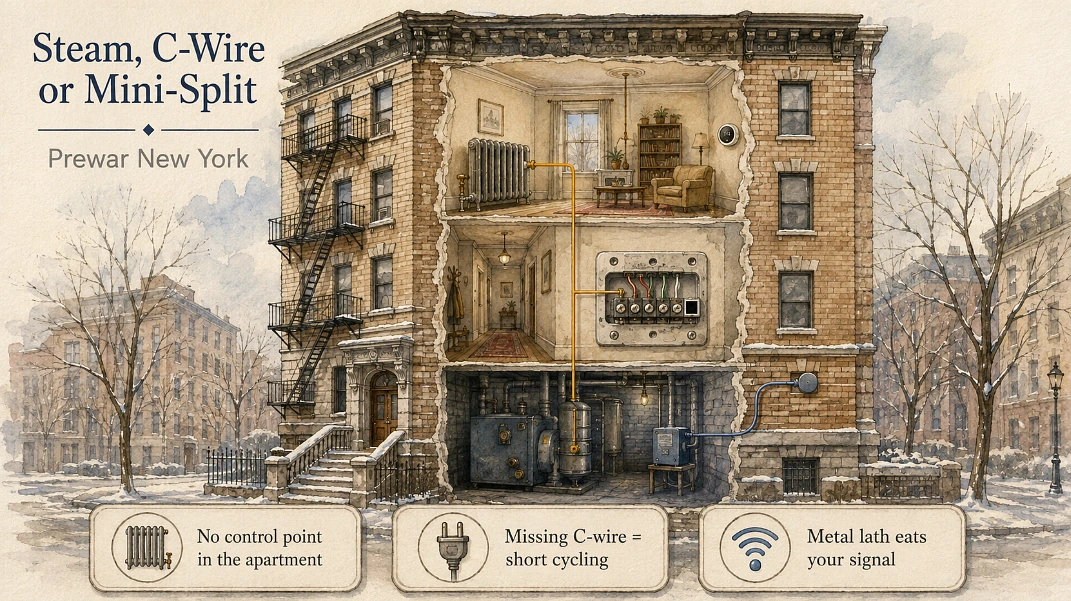
The first smart home purchase in most New York apartments is a thermostat. It is the thing every guide puts at the top of the list, it is cheap enough to try, and the reviews are glowing.
Then it arrives, and a good number of people discover there is nothing in the apartment to connect it to.
That is not a defect in the product. It is the building. And once you start pulling on that thread, most of the standard advice comes apart in the same way, because it was written for a house in New Jersey with drywall, forced air, a garage and no board of directors.
Start with the heat, because that is where everyone starts
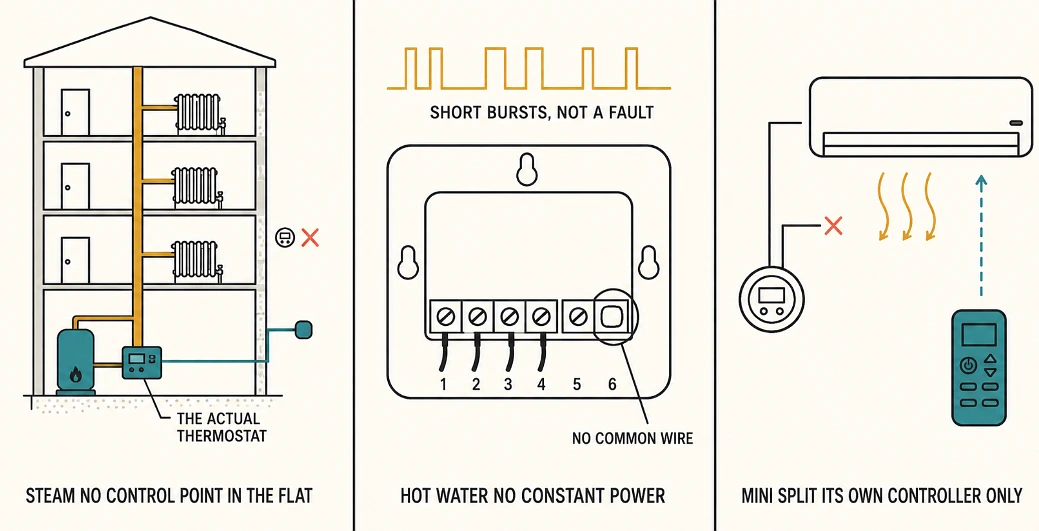
Most prewar New York buildings run on steam, one pipe or two, and a steam system does not give an individual apartment temperature control at all. The boiler fires, the steam goes up the risers, and your radiator gets whatever the building sends it.
There is usually a heat timer in the basement deciding all of this, often set against an outdoor sensor mounted on the building wall. That timer is the thermostat for your apartment. It is not in your apartment, you do not have access to it, and the super does.
So what is a Nest supposed to control here? Nothing. There is no signal wire running from your living room to anything.
The actual answer in a steam building is a thermostatic radiator valve, which is a mechanical valve that traps air in the radiator so steam stops entering it, and it costs a few hundred dollars through a plumber or your super. They need replacing every five to ten years. You can put smart temperature sensors in the rooms and automate around the valve, but the valve itself is the part doing the work, and no app replaces it.
If you do have a thermostat on the wall
Plenty of apartments and brownstones do, usually on a hot water boiler rather than steam, and this is where the second problem shows up.
Older thermostats were mechanical. Two wires, no continuous power, because a mercury switch does not need any. Every modern smart thermostat needs constant 24 volts to stay on wifi, and that comes from a common wire, the C-wire. A lot of New York installations simply do not have one.
Without it the thermostat tries to steal power through the heating circuit, and the symptom is the equipment pulsing on and off in short bursts. People assume the unit is faulty and return it. It is not faulty, it is starving.
The fix is either pulling a real C-wire from the boiler, which means someone opening things up, or fitting the manufacturer’s power adapter kit at the boiler end. Both are jobs, neither is a forty-five minute swap.
And if you have mini-splits
Brooklyn has more ductless mini-splits per square mile than almost anywhere in the country, and none of them use a wall thermostat. They run on their own handset or their own proprietary controller, and a Nest cannot talk to them at all without a separate bridge device made for that specific brand.
Three different heating situations, three different reasons the standard recommendation fails. That is before we get to the walls.
Plaster and lath were not designed with wifi in mind
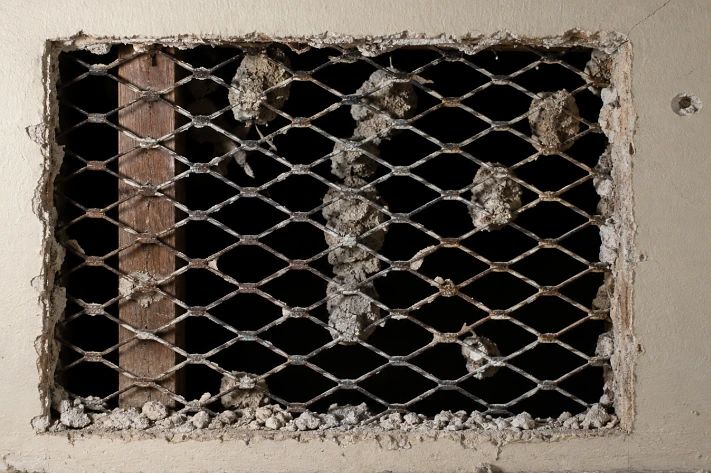
Prewar in New York generally means before 1945, and it means plaster walls, thick floor slabs, and in a lot of buildings that plaster was keyed onto metal lath, which is a mesh of thin steel.
Metal mesh in a wall does to a wireless signal roughly what the mesh in your microwave door does to microwaves. It does not block it completely, but it attenuates it badly, and a sensor two rooms away that would be fine in a suburban house drops off the network here.
Then add the neighbors. A Manhattan apartment can see well over a hundred wireless networks from where you are standing, all of them competing for the same 2.4GHz airspace, and 2.4GHz is exactly where most cheap smart devices live. Zigbee sits in that band too, which is why Zigbee bulbs and sensors behave worse in a dense building than the box promised.
Z-Wave runs down at sub-1GHz, below all that traffic, which is a real advantage in a crowded building even though it is the less fashionable protocol and the device selection is thinner.
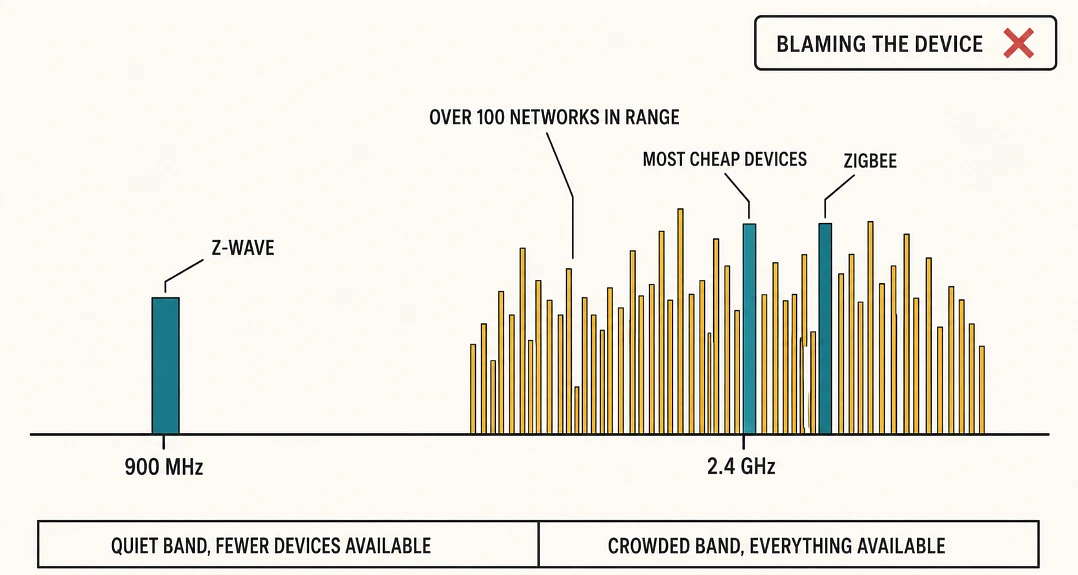
None of this is in the buying guides, because in a suburban house it genuinely does not matter.
The board is part of your installation whether you like it or not
Prewar buildings in New York are overwhelmingly co-ops, and that changes who has to say yes before work happens.
Running new wiring for ethernet, in-wall speakers or cameras usually requires an alteration agreement. That means paperwork, a licensed and insured contractor, certificates of insurance naming the building, and in a lot of buildings an engineer or architect reviewing the plan. Some alteration agreements require notice even for cosmetic work, if contractors are going to be using the common hallways.
Buildings also have their own rules about wireless access points, ethernet runs and anything that touches the exterior, which is where door cameras and video intercoms usually die.
This is the point where doing it yourself stops being realistic for most people, and it is a large part of why Smart home automation in New York is a different trade from smart home automation anywhere else. The install is half technical and half administrative, and a firm that has been through a few dozen alteration agreements arrives with the documentation package already written, which is not something you can download.
Renting changes the list completely
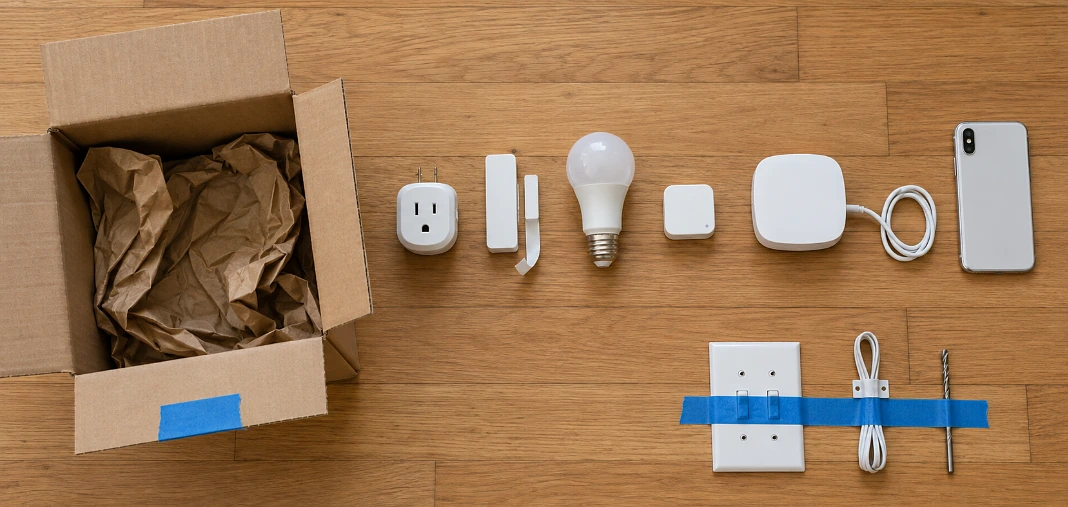
A very large share of New York households rent, and almost every automation article quietly assumes you own the place and can drill into it.
What actually works in a rental:
- Smart plugs, which do lamps, fans and the coffee maker without touching anything.
- Battery sensors on doors and windows, stuck on with adhesive, removable.
- Smart bulbs, since the fixture stays and the bulb goes in your box when you move.
- Temperature sensors in each room, useful in steam buildings for knowing which rooms are cooking and which are freezing.
- A hub that lives on a shelf rather than in a wall.
What causes problems: replacing switches, which is electrical work most leases prohibit, anything mounted to the exterior of the building, and anything that needs a hole. Smart locks are the one worth asking about specifically rather than assuming, because some landlords are fine with them and some consider the lock building property.
The good news for renters is that all of the above leaves with you, which is more than can be said for a whole-apartment lighting system.
What I would do in what order
Find out what your heat actually is first. Steam, hot water, mini-splits, electric baseboard. Ten minutes of looking at the radiator and asking the super, and it eliminates most of the wrong purchases before you make them.
Then test your wireless before you buy sensors, meaning walk to the far corner of the apartment with your phone and see what the signal is doing in the room where you want the device.
Then, if you own and you want anything that lives inside a wall, read your alteration agreement before you get attached to a plan. It is dull and it will tell you what is possible in your specific building, which is more than any article can do, this one included.
 Decor & Improvement Accessories