

Home & Decor Blogs: DIY, Interior Design & Lifestyle Ideas
The Smart Home Decisions You Can Only Make Before the Drywall Goes Up
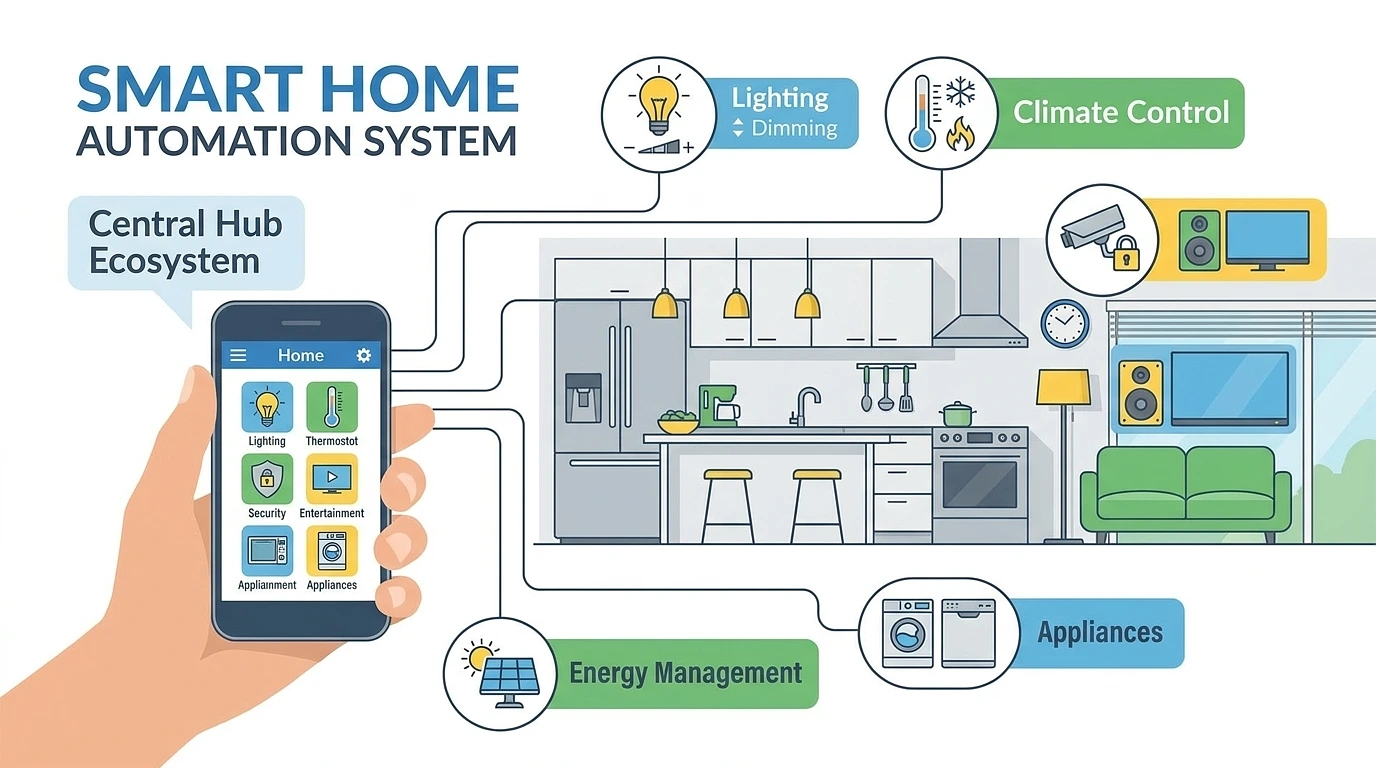
Here’s the thing nobody really tells you when you start a new build. Almost every smart home article out there is written for someone who already lives in a finished house and just wants to add a few gadgets, a smart plug here, a video doorbell there, and that’s fine for them but it’s not your situation at all. You’ve got the walls open and the electrician already on site and the panel sitting there exposed, and you have maybe two weeks where you can do things that get four times more expensive the day that drywall closes up.
So this isn’t a list of nice devices to go buy. The decisions that actually matter right now are the ones you physically can’t redo later, not without cutting holes in finished walls and patching and repainting and basically paying for the same job twice. Get those right and honestly the gadgets sort themselves out later. Get them wrong and you’re either living with the annoyance for as long as you own the place or you’re paying someone to tear into the drywall to fix what should’ve been done while it was open.
Let’s go through what’s actually worth your attention while you still can.
The One Number That Should Scare You Into Acting Now
Before anything else, here’s the figure that makes this whole thing urgent. A cable run that costs around $200 to pull while the walls are open runs about $800 once the drywall is up. Same cable, same room, four times the price, and that’s before you count the patching and repainting. Retrofitting a whole house after the fact tends to land 60 to 70 percent higher than doing it during the build.
That gap is the entire reason this article exists. Everything below is just deciding what to spend that cheap window on.
Run Way More Cable Than You Think You Need
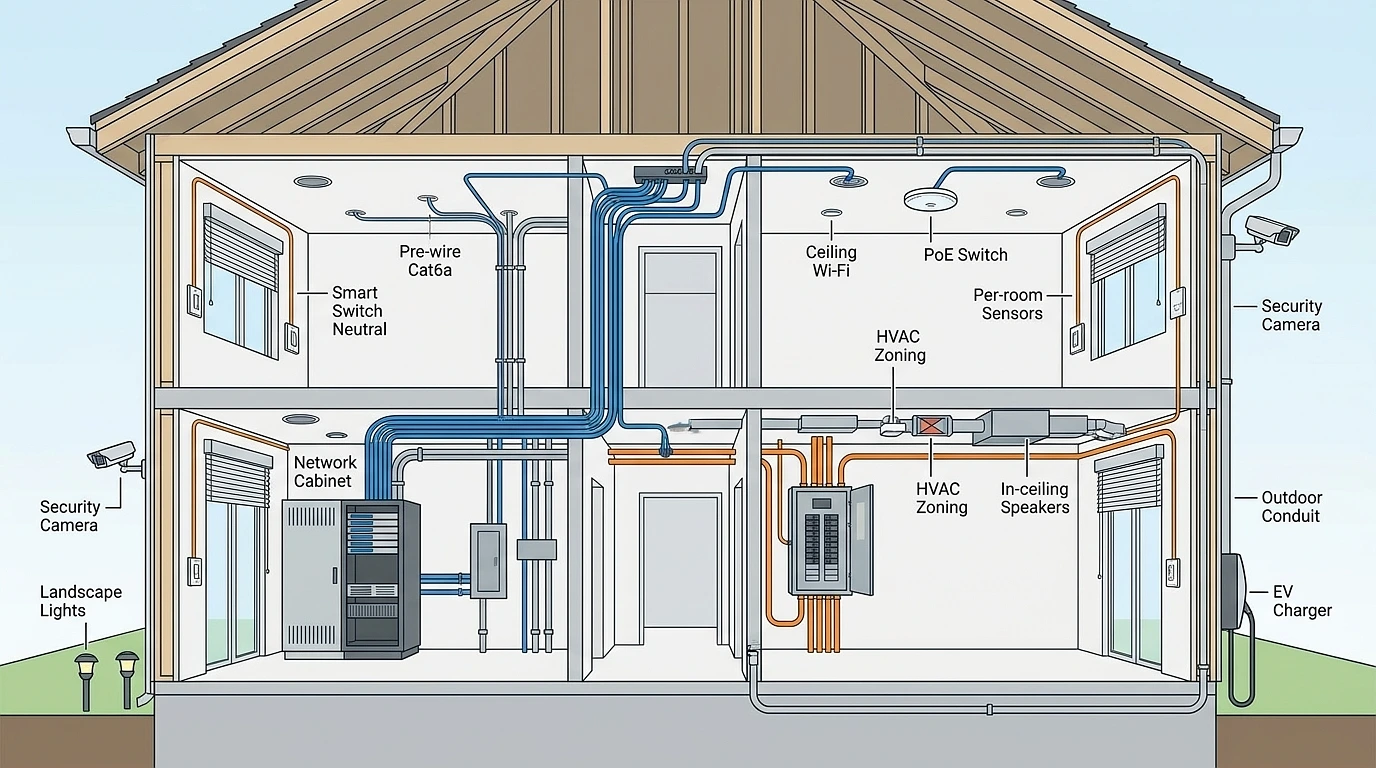
If you take one thing from this, it’s this. Pull Cat6a ethernet to every room, and not one drop either, do two per bedroom and four in the living areas where the TV and AV gear ends up. Cat6a, not Cat5e. The raw cable barely costs more and Cat5e is going to feel slow long before you sell the house. People always underestimate how many runs they’ll want and almost nobody ever wishes they’d run less.
A few things that quietly wreck a wiring job, and you won’t catch them unless you know to look:
- Daisy chaining. Some electricians will run one data line into a room, then carry on from that jack to the next room to save cable. Don’t let them. Every single run needs to be its own line going straight back to the central panel, what’s called a home run. Daisy chained data lines cause problems that are miserable to diagnose later.
- Cheap copper-clad aluminum cable. It’s brittle, it’s not certified for Power over Ethernet, and it’s the kind of thing a cut-rate installer uses to shave the bill. Make sure you’re getting solid copper core. Ask, and check.
- Forgetting the demarc conduit. You want a conduit running from the outside utility box, where your internet actually enters the house, to your inside media panel. Skip it and you’ve made every future internet or fiber change a wall-cutting job.
And run conduit, empty flexible conduit, through the walls to anywhere you think you might want a cable someday even if you’ve got nothing to put in it now. That’s the trick that saves you in five years. Conduit means you pull new wire later without opening a single wall. It is cheap insurance against a future you can’t predict yet.
One more standard worth knowing, the current rule of thumb is to build in about 25 percent spare capacity over what you need today. Extra drops, extra breaker slots, extra room in the network cabinet. You will use it.
Don’t Forget the Stuff That Lives Outside the Walls Too
While everyone’s focused on the inside, the outdoor runs are the ones people skip and regret hardest. Power and conduit out to where security cameras go, to landscape lighting, the gate, and an EV charger spot even if you don’t own the car yet. There’s a well-worn story in this trade of someone wiring only the main floors, skipping the garage and patio, then paying three or four thousand later to add camera and charger runs that would’ve been a fraction of that during the build. Easy to forget when the house is a shell. Genuinely painful to add once it isn’t.
Same logic with the electrical side. Smart switches need a neutral wire in the box, motorised blinds need power up at the window header, in-ceiling speakers need both signal and power pulled to them. Have the electrician confirm a neutral in every switch box, that one catches people out constantly. And leave spare breaker slots. You’re going to add things.
Wired or Wireless? This Is the Call Only You Can Make Now
This is the one decision a new build lets you make that a finished house doesn’t, so it’s worth slowing down on.
Wired systems, the Control4 and Lutron and Crestron tier, run dedicated cable through your walls. They’re faster, they don’t drop, and they don’t care how busy your Wi-Fi is. The catch is they need professional installation during the build and they cost more up front. Wireless systems, your Google Home and Alexa and Apple Home setups running over Wi-Fi or Thread, are cheaper and easier to change and you can do a lot of it yourself, but they lean entirely on how good your network is and they can lag or drop.
For a new build the honest answer is don’t pick one, do both. Hardwire the things that are a nightmare to redo and that you want rock solid, your lighting circuits, security, climate control. Use wireless for the stuff you’ll happily swap out in a few years anyway, speakers, sensors, voice assistants. The wired backbone is the part you can only get cheaply right now. The wireless layer you can add and change forever.
This is also the point where a finished house just can’t compete with what you’re doing, and where it stops being a DIY job. The wired backbone, the lighting control, integrating the security and running it all back to a proper panel, that’s specialist work that has to happen in coordination with your electrician before the walls close. If you’d rather not gamble your one cheap window on getting that coordination right yourself, this is where bringing in a firm that does new construction specifically, like Home-A-Genius, earns its money, because they plan the rough-in and handle the post-install side instead of leaving you to discover the gaps after the drywall’s up. The cheapest quote is rarely the right one here, get three of them and look at scope, not just the bottom line.
Pick Matter Now and Save Yourself the Hub Graveyard
You’ve probably heard people complain about smart homes where nothing talks to anything, five hubs plugged into the router and twelve apps just to turn off the kitchen lights. That mess is mostly over if you choose right at the start.
Matter is the standard that fixed it, backed by Apple, Google, Amazon and Samsung, and as of now it’s basically the default. Buy Matter-certified devices wherever you can and they pair across whichever app you use. The single best part of it is something called multi-admin, which means one device, say a smart lock, can be connected to more than one platform at once, so if you’re on an iPhone and your partner’s on a Samsung you’re not forced to pick a side anymore.
Couple of things the box won’t make obvious:
- “Matter over Wi-Fi” and “Matter over Thread” are not the same thing. A Matter Wi-Fi camera behaves differently from a Thread battery sensor. Thread is the low-power mesh that’s better for little battery devices like sensors and locks, so lean Thread for those.
- Support still varies by ecosystem. Matter being the standard doesn’t mean every platform supports every device category yet, the implementations are at different stages. So check that the specific thing you’re buying actually works fully with the app you plan to live in, don’t just trust the logo.
- You need at least one controller and a Thread border router. Good news is you probably get the border router for free, a lot of modern smart speakers, nicer routers and even some TVs already act as one.
The practical move, lean Matter-certified, use a hub that handles multiple protocols, and you’ve kept your options open as this stuff keeps changing.
Plan Where the Switches and Sensors Go Before You Can’t
This costs nothing to do and saves a lot of irritation. Walk your floor plan and actually imagine moving through the house. Where does your hand reach for a switch when you come in a door, that’s where the smart switch goes, at normal height by every entry. Where do you walk that lights should just come on by themselves, that’s a motion sensor.
The best interface, honestly, is no interface. A light that comes on because you walked in beats one you had to pull your phone out and unlock to control. So plan for sensors and schedules to do the boring stuff automatically, and keep simple physical switches or keypads around too, because guests and family who don’t care about any of this still need something obvious to press. Don’t build a house where turning off a lamp requires a tutorial.
Where to Actually Spend, and Where Not To
Budgets here run from a DIY wireless setup in the low thousands to fully custom Crestron-level integration well into six figures. Most people land somewhere in the middle. Rather than throw a number at you, here’s where the money actually earns its keep versus where it’s mostly for show.
| Spend here first | Skip or wait |
|---|---|
| Network infrastructure — the backbone everything rides on, never cheap out here | Smart appliances — a smart fridge adds almost nothing, buy a normal one |
| Lighting control — you touch lighting more than anything else in the house | Trendy gadgets — robot vacuums, smart mirrors, fun but not infrastructure, buy later when they’re cheaper |
| Security — locks, cameras, sensors give you real practical value day one | |
| Climate — a good smart thermostat usually pays for itself in energy savings within a couple of years |
The rule underneath the table, spend on the things buried in the walls and the things you use constantly. Hold off on the things that are easy to add later and mostly there to impress people.
Lock Down Privacy Before a Single Device Is Live
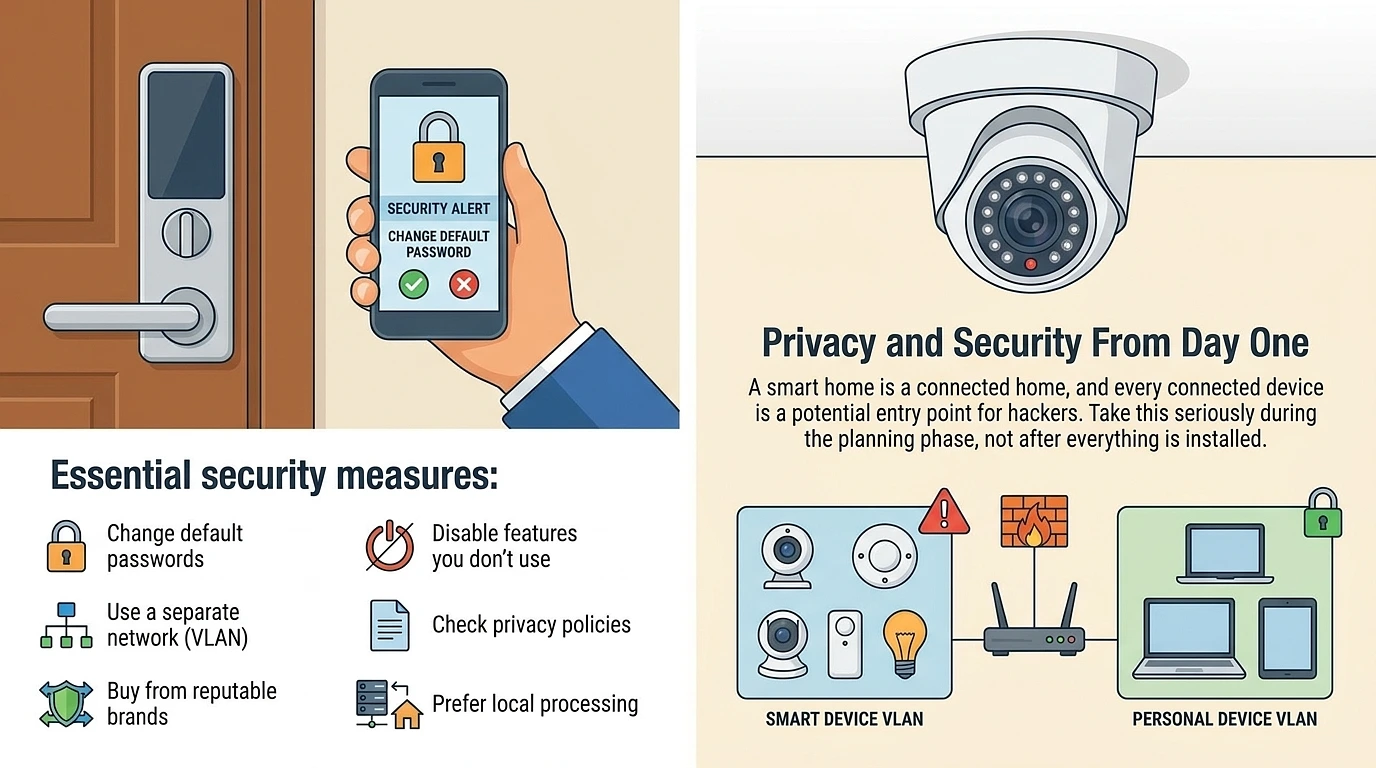
A connected home is a bunch of doors into your network, and every cheap sensor is one of those doors. Sort this during planning, not after everything’s already talking to the internet.
The essentials, and none of this is optional:
- Change the default password on every single device. This is how most smart home break-ins actually happen, not clever hacking, just devices left on the factory password.
- Put your smart devices on a separate network, a VLAN. So if some $15 sensor gets compromised, it can’t reach the laptop with your banking on it. This is the single biggest thing that diagram up there is showing you, and it’s far easier to set up while you’re building the network than to retrofit.
- Buy from brands that actually push security updates, and check the privacy policy because some platforms sell your usage data and some don’t.
- Prefer local processing over cloud where you can. A device that works without phoning home to a server is better for privacy and keeps working when your internet drops.
Test Everything Before They Close the Walls. Seriously.
This last one is specific to new builds and it’s the one that bites hardest if you skip it. Before the crew closes up, go through and check every cable run with a tester, confirm the conduit paths are actually clear, and make sure the switch and box placements line up with where your furniture and TVs are actually going. Run a network test from every access point spot.
And take photos. Lots of them, every wall cavity, showing exactly where the cable runs, and store them somewhere you won’t lose them. When you want to change something in five years, those photos are the difference between knowing where to cut and guessing. One day of this saves you thousands later. It’s the cheapest insurance in the whole project and the easiest to skip when everyone’s rushing to close the house.
That’s the list. Not the gadgets, the bones. Spend your two weeks on the things you can’t undo, and the smart home part gets easy from there.

 Decor & Improvement Accessories